Vibe coding and every fix makes it worse? Find where it broke in 6 minutes
Vibe coding and the AI keeps rewriting code without fixing it? It cannot tell where the app broke. The 8 stops after you press Enter, and what to tell it.
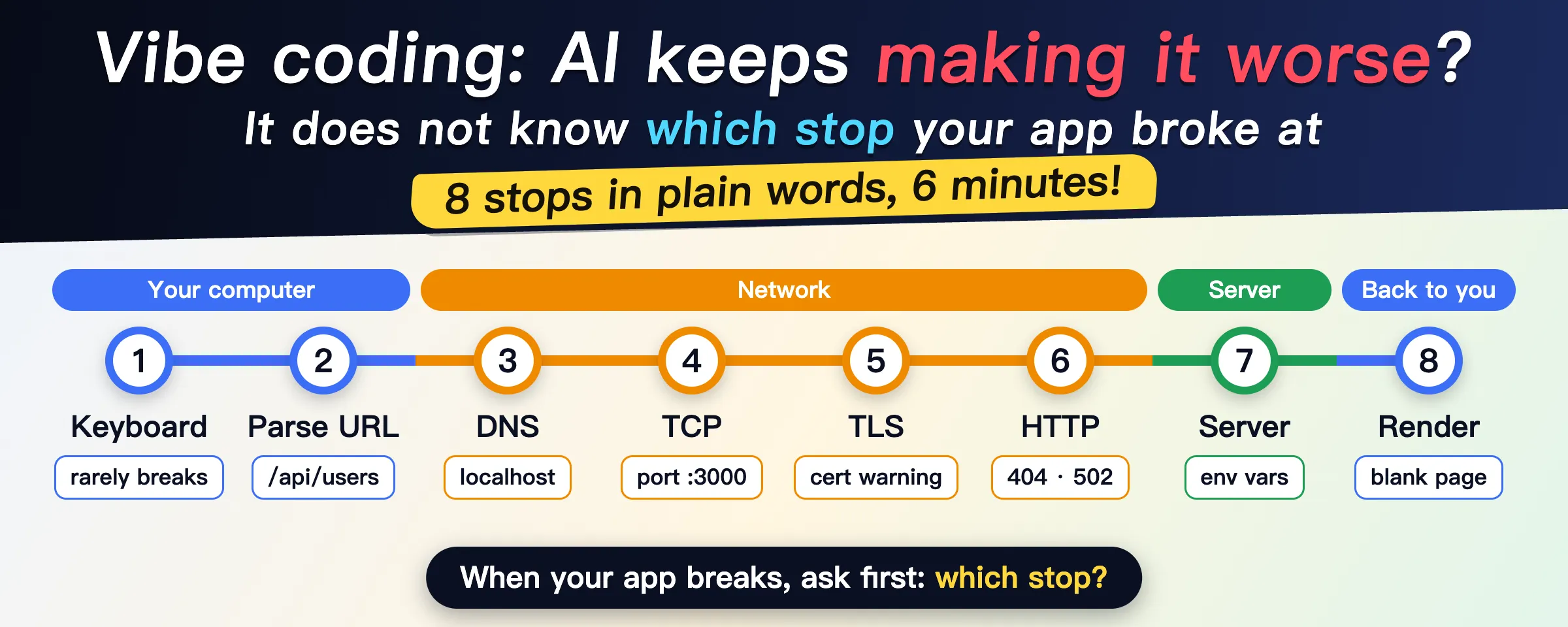
You paste the error into your AI. It rewrites the code and nothing improves. You paste again, it rewrites again, and now something that used to work is broken too. A localhost:3000 link that won’t open for your friend, a blank white page after going live, an app that runs on your laptop and fails the moment you deploy: problems like these slide into that loop easily.
The AI does not know where your app broke, so it guesses. When the guess is wrong, the code it changes was never broken. You can’t tell it where to look either, because you don’t know what happens between typing a URL, pressing Enter, and seeing the page.
The trip has 8 stops in three segments: your computer, the network, the server. When something breaks, work out which stop it is before you ask the AI to fix anything. The whole article is a 6-minute read. If you are short on time, start with this lookup list:
- A
localhostlink won’t open for your friend: stop 3.localhostonly means your own computer, so deploy the app before anyone else can reach it. - A domain you just connected won’t load: stop 3. Wait a few minutes, then check the DNS records on the platform.
port 3000 is already in use: stop 4. The program you started last time is still running.- A certificate warning: stop 5. If you just connected the domain, wait for the platform to finish issuing the certificate.
404,500,502: stop 6. Read the first digit of the status code first.- Works locally, breaks when deployed: stop 7. The server does not have your
.env, so set the environment variables on the platform. - A blank white page: stop 8. Open the Console and look for red text.
- Can an API key go in the frontend: stop 8. No. Anyone can read frontend code.
Here are the 8 stops in plain words, no computer science needed. The example is my own blog, ones.pub.
Stop 1, keyboard to browser: this layer rarely breaks
You press Enter. The keyboard turns the keypress into a number and sends it to the computer. The operating system checks which window is in front and hands “Enter was pressed” to the browser.
Go deeper and there are USB circuits and interrupts, and you can skip all of it. Keep one idea: a computer is built in layers, and each layer does its own small job and passes the result up. Every stop below works the same way.
Stop 2, the URL: every page and every endpoint is an address
The browser takes https://ones.pub/ and splits it into three parts:
httpsis the protocol, the rules both sides talk by.ones.pubis the domain, who you are looking for./is the path, which page of theirs you want.
Where you run into it: when the AI says “the request to /api/users failed”, it means that path under some domain. Send it the full address together with the error.
Stop 3, DNS: why localhost won’t open for your friend
Machines on the network only know each other by IP address, a string of numbers, like a phone number. Domains exist for people, so the browser first has to turn the name into an IP. The lookup system is called DNS. For ones.pub the answer is 104.21.50.50 and 172.67.157.29, and the browser picks one.
The lookup asks from near to far, one level at a time, and every level remembers the answer for a while so it does not have to ask again.
Where you run into it:
localhostis a special name that always means “this computer”.localhost:3000opens for you and not for your friend, because theirlocalhostis their own computer. To let anyone else in, deploy the app.- You just connected a domain and it won’t load. Wait a few minutes first, because each level of DNS needs a little time to pick up the new answer. If it still fails, go back to the platform and check that the DNS records are filled in correctly.
Stop 4, the connection: what “port already in use” means
An IP is not enough. You also need a port. The IP is the street address of a building and the port is the room number: one machine runs many programs at once, and each one listens on its own port. Web pages use 443 (https) or 80 (http) by default, so you normally never type it.
The two machines first check in with each other (“Are you there?” “I am.” “Let’s start.”) and the connection is open. This is TCP. Data is cut into small packets and passed along hop by hop, and TCP resends any packet that gets lost, so you never have to think about it.
Where you run into it:
localhost:3000,:5173,:8080in local development. The number after the colon is the port.- The error
port 3000 is already in usemeans a program is already in that room, usually the one you started last time and never stopped. Stop it, or pick another port.
Stop 5, TLS: where certificate warnings come from
This is the s in https. Before anything real is said, the server shows a certificate that proves “I really am ones.pub”. Once the browser has checked it, the two sides agree on a key that only they know, and everything after that is encrypted. Anyone who intercepts it on the way sees noise.
Where you run into it: the padlock in the address bar, and the “Your connection is not private” warning. Hosting platforms like Vercel and Cloudflare get and renew certificates for you. If you see the warning right after connecting a domain, the platform is probably still issuing the certificate. Try again in a few minutes.
Stop 6, HTTP: how to read 404, 500 and 502
With the connection open and encrypted, the browser sends its request. The first line says roughly GET /. GET means “give me something”, while submitting a form or saving data uses POST. / is the page you want. The first line of the server’s reply is the status code. This is the start of the real reply from ones.pub:
HTTP/2 200
content-type: text/html
server: cloudflare
Read the first digit of the status code:
2xxsuccess.200means everything is fine.3xxget it somewhere else.301and302mean it moved, and304means the copy you already have is still good.4xxsomething is wrong with the request.404means this address does not exist.401and403mean you are not logged in or not allowed.5xxsomething went wrong on the server.500means the code on the server crashed.502means the program at the front door is up and the one behind it that does the work did not answer.
Where you run into it: every day. Whenever your app calls an endpoint, an AI API included, it speaks HTTP. Right-click the page and choose Inspect to open the developer tools (F12 also works on Windows), then switch to the Network panel. Every request is listed there with its status code. Giving the AI the status code helps it far more than “it won’t load”.
Stop 7, the server: why it works locally and breaks when deployed
The request reaches the server. A program there is always waiting for work. It checks which path the request wants and whether this person is allowed, then hands it to the matching code, which queries the database, works out the result, builds a page or a piece of data, and sends it back the way it came. The “backend” your AI wrote runs here.
Where you run into it:
- This is a different machine. Anything that did not travel with your code is missing there: your local
.envfile, your keys, the database installed on your laptop. Most “works locally, breaks when deployed” problems come from here. Copy every entry in your.envinto the environment variables page on your hosting platform. - Users cannot see the code that runs here, so keys and database passwords belong on this side only.
Stop 8, rendering: the blank page, and the key that must stay out of the frontend
What the browser receives is HTML, which is plain text. It reads the HTML to build the skeleton of the page, then downloads the CSS, images and JavaScript the HTML mentions, each one with a new request. It lays the page out by the CSS and paints it on the screen, and finally runs the JavaScript, which is what lets you click, type, and see content update without a reload.
Where you run into it:
- A blank white page. When HTML is broken, the browser guesses what you meant and keeps drawing. When JavaScript hits an error, that script stops right there, so a blank page is usually a JavaScript problem. Open the Console in the developer tools and copy all of the red text to your AI.
- Frontend code is public. HTML, CSS and JavaScript are sent to the user’s browser and run there, so anyone can open the developer tools and read them. An API key in your frontend is an API key posted on the street. Call paid APIs from the backend.
Stop the AI from making it worse: tell it three things
If you can’t name the stop, at least name the segment. A blank page and red text in the Console are on your computer’s side, and the fix is in your frontend code. A domain that won’t load and certificate warnings are in the network. 5xx and “works locally, breaks when deployed” are on the server.
Then tell the AI:
- Which stop broke, or which segment, and to change only that.
- What you saw: the status code, the red text in the Console, the exact error message.
- Whether it works locally, and what you changed recently.
Now it knows where to look, and it leaves the working code alone.
The route through these 8 stops comes from a GitHub repo with more than 40k stars, what-happens-when. It was written for engineers and runs from the keyboard circuit to the GPU in a bit over 700 lines. Read it if you want the full detail.
Which stop has cost you the most time while vibe coding? Reply and tell me, and I will write that one up next.